
ASD Player
v4.3.26
ASD Player is a modern and easy-to-use media player designed for Android smartphones and smart TVs. Today, people watch videos, listen to music, and stream online content every day, so having a reliable media player is very important. ASD Player focuses on smooth playback, simple controls, and a clean interface that works well for both beginners and advanced users.
Many users prefer ASD Player because it supports multiple media formats, offers high-quality playback, and runs smoothly even on mid-range devices. Whether you want to watch movies, play local videos, or enjoy music, ASD Player aims to deliver a simple and stable entertainment experience.
In this complete guide, you will learn what ASD Player is, its features, benefits, supported devices, performance tips, and why it is becoming popular among Android users.
What Is ASD Player?
ASD Player is a multipurpose multimedia player developed mainly for Android devices such as smartphones, Android TVs, and TV boxes. The main goal of the app is to provide smooth video and audio playback without complicated settings.
Unlike heavy media applications that can slow down devices, ASD Player is built to be lightweight while still offering advanced features like subtitle support, HD playback, and customizable controls.
The app allows users to play local media files directly from their device storage and manage content easily through a simple interface. Because of its clean design, even first-time users can quickly understand how to use it.
Key Features Of ASD Player
Customizable Playback Controls
With ASD Player, you can control the playback settings, including the playback speed, audio, subtitles, and video quality. It makes watching movies better for instance, one can fast-forward through scenes of a film or reread scenes of instructions in a tutorial video.
Seamless Media Integration
The player interacts with the system and your device’s media libraries and automatically searches for media files. That way, it is much easier to reach your favorite videos or songs without having to browse through files manually.
High-Quality Streaming with Minimal Buffering
ASD Player supports the use of multiple streaming protocols to render the best possible content of quality with very short buffering times. The app automatically modifies the streaming quality depending on your internet connection speed, thus providing a smooth streaming experience continuously with slow networks.
Live TV and Streaming Support
ASD Player is not limited to playing video files on the device. It is also capable of streaming live TV and has a lot of online video content. It is a great option for all customers who want to watch live TV, sports or video on demand movies anywhere and anytime. The app guarantees users access to any live content as fast as possible with as little buffering as possible.
How To Download and Install ASD Player on Android Smartphones and TVs?
Follow these easy steps to download and install ASD Player on your Android smartphone or TV.
For Android Smartphones:
- Open Google Play Store: Open Google Play Store on your Android phone.
- Search for ASD Player: In the search bar at the top, type “ASD Player” and press Enter.
- Select ASD Player: Once entered, an Install button will appear next to the official ASD Player at the top of the search results.
- Tap Install: On the app’s page, click the Install button to begin the download process.
- Wait for the Installation: Wait a few moments for the app to download and install. Once it’s done, the Open button will appear.
- Open the App: Tap Open to launch ASD Player and start enjoying its features on your smartphone.
For Smart TVs:
- Go to Google Play Store on TV: Turn on your Android TV and open the Google Play Store from the home screen.
- Search for ASD Player: Type ASD Player in the search bar above, you will get the option of official ASD Player.
- Select the App: Install button option will appear next to ASD Player.
- Install the App: Click the Install button to begin downloading the app.
- Wait for Installation: The app will be installed automatically. Once it’s finished, you can select Open.
- Enjoy ASD Player: Enjoy all live TV and shows using the app on your TV for better media playback.
How To Use ASD Player On Your Smart TV (Android TV Box or Smart TV)
To use ASD Player on your Smart TV (Android TV box or Fire TV device), follow these simple steps:
- Install Downloader App: Go to the Google Play Store (Android TV) or Amazon App Store (Fire TV) on your smart TV and download the Downloader app.
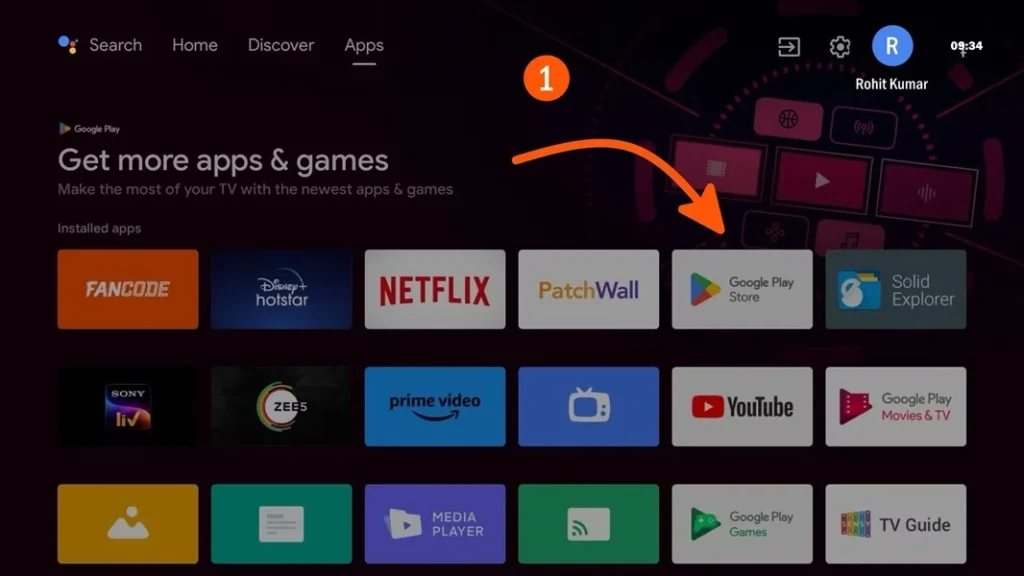
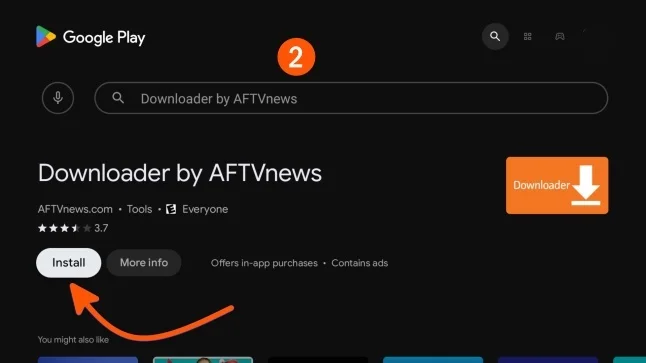
- Open Downloader: Type downloader app in the search bar. The option of official downloader by AFTVnews will appear. Launch the app by tapping on the install button next to the app.
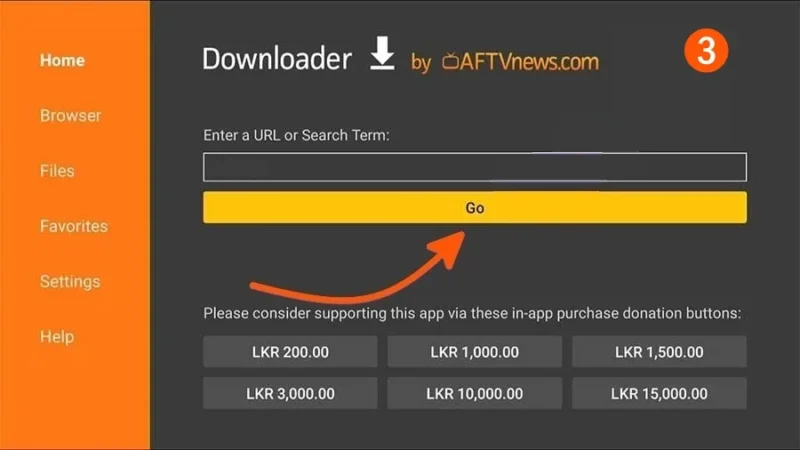
- Enter URL: In the URL bar, type the download link for ASD Player App. If the option to enter a code appears, input the code 773516 and press Enter.
- Download App: Wait for the ASD Player app to download successfully.
- Install App: After downloading, tap on the Install button to setup ASD Player app on your Smart TV.
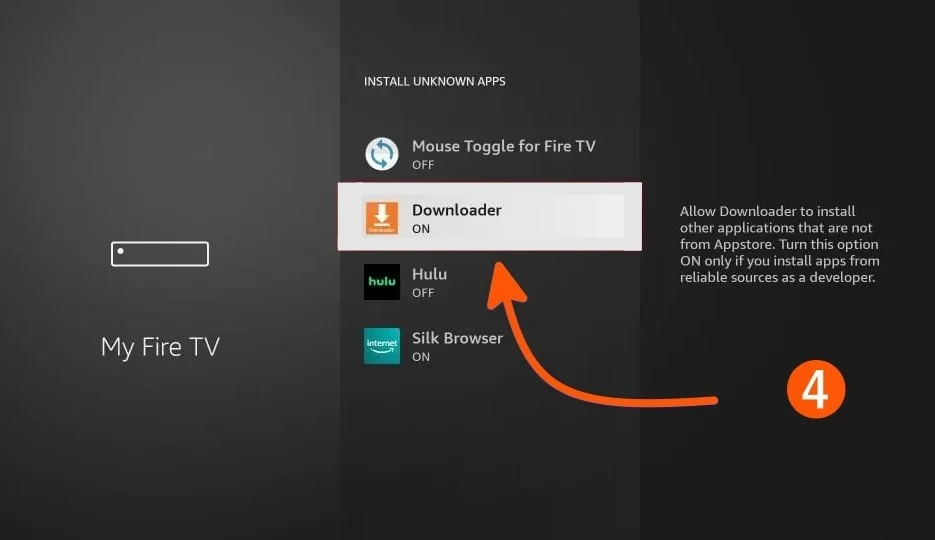
- Enable Unknown Sources: For Android TV, go to Settings > Device Preferences > Security & Restrictions > Unknown Sources and enable it for Fire TV, go to Settings > My Fire TV > Developer Options > Apps from Unknown Sources and turn it on.
- Open ASD Player: Once installed, open the app from your Apps menu.
- Set up ASD Player: To complete setup, sign up and create an account on ASD Player.
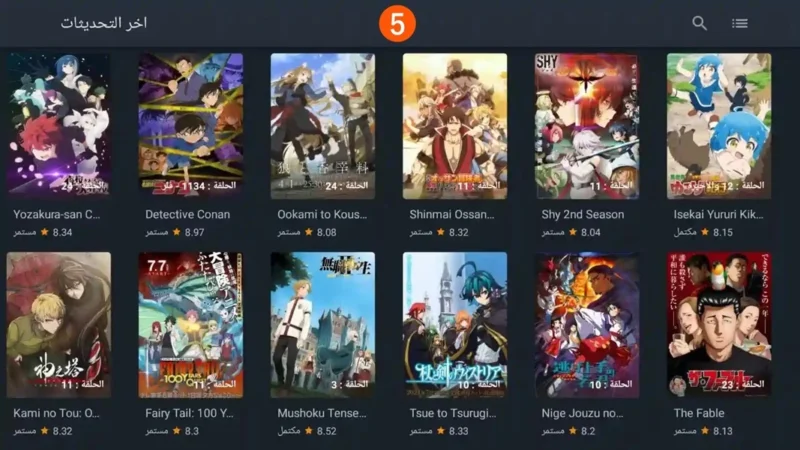
- Enjoy: Now you can enjoy all content streams by login to ASD Player.
ASD Player vs Other Media Players
Many people compare ASD Player with other popular media players. Here is a simple comparison:
| Feature | ASD Player | Traditional Players |
|---|---|---|
| Interface | Simple & clean | Sometimes complex |
| Performance | Lightweight | Can be heavy |
| Format Support | Wide | Varies |
| Ease of Use | Beginner friendly | Depends on app |
Why ASD Player Perfect For Android TV?
ASD Player is a great media player for both Android phones and smart TVs. It’s easy to use and packed with features, making it perfect for better home entertainment.
Superior Streaming Quality
ASD Player provides ultra high definition streaming of even 4K resolution so that it can be enjoyed to the fullest on the Android TV. So whether it is live sports or videos being streamed, it guarantees the best possible quality while leveraging the television optimally.
Easy Navigation on Larger Screens
Designed for large screen use, the ASD Player’s interface allows for intuitive navigation with the TV remote. With full-screen video, simple controls, and quick access to your content, it offers seamless media management on the big screen.
Smart TV Compatibility
Among the entry level and high-end versions of android powered smart tvs, the ASD player serves all seamlessly offering superior multimedia experience on all different variants.
Support for External Devices
Users are able to utilize external devices including USBs and hard disks and playback content locally. This feature provides options for people that don’t necessarily utilize streaming services for their media consumption.
System Requirements and Supported Devices
ASD Player works on a wide range of devices. Here are general requirements:
- Android OS 5.0 or higher
- Stable internet connection for updates
- Minimum 1 GB free storage
- Compatible with Android smartphones, tablets, and smart TVs
Because it is lightweight, it performs well even on mid-range devices.
Why Choose ASD Player Android Smart Phone?
Android smartphones are great for customization and offer a lot of apps. ASD Player is a standout app because it performs well, supports many formats, and is easy to use.
- Seamless Media Playback: ASD Player allows for seamless and continuous video playback from local files, internet streaming, or audio files. It guarantees its users the best performance regardless of the type of video, be it in HD or 4k, in most cases there are no loading or buffering problems.
- Versatile Format Support: Another unique feature of ASD Player is its ability to play a large number of different media files. It allows any type of files including video (mp4, mkv, avi), audio (flac, mp3) and graphics, thus no user experiences any media incompatibility.
- Enhanced User Interface: The application has a very elegant, straightforward design, which is also highly intuitive. New users should find no difficulty in using the application’s interface. Users are also able to control the various elements of their media through features such as playback speed, subtitles, and volume control.
- Multi-Language Support and Subtitles: The audience of ASD Player is international, as it supports several languages. Subtitles are also provided in different languages which is great for foreign audience or for people who prefer content in other languages.
Is ASD Player Safe to Use?
Safety is very important when installing any software. ASD Player is generally safe when downloaded from trusted sources.
Here are some safety tips:
- Avoid downloading from unknown websites
- Check app permissions before installing
- Keep your device updated
- Use antivirus protection if possible
Following these steps can help keep your device secure.
Tips to Improve ASD Player Performance
If you want the best experience, try these tips:
- Close background apps while watching videos
- Use updated version of ASD Player
- Clear cache regularly
- Adjust video quality according to device performance
These small changes can improve playback speed and reduce lag.
Common Problems and Solutions
- Video Not Playing
- Sometimes videos may not play because of unsupported codecs or corrupted files. Try updating the player or checking the file.
- No Sound Issue
- Check device volume and audio settings inside the player.
- Subtitles Not Showing
- Make sure the subtitle file name matches the video file name.
Future of ASD Player
As digital entertainment continues to grow, media players like ASD Player are becoming more important. Developers are focusing on improving performance, adding smart features, and making playback smoother.
In the future, ASD Player may include more advanced options like:
- Online streaming support
- Cloud media access
- Better customization features
These updates can make it even more useful for daily users.
FAQs
What is ASD Player?
ASD Player is a media player app that allows users to watch videos, streaming links, and playlist content easily on mobile or desktop devices.
Is ASD Player free to use?
Yes, ASD Player is usually free to download and use. Some features may depend on the version or platform you are using.
How do I add videos or playlists in ASD Player?
You can add content by pasting a video URL, loading an M3U playlist, or opening local video files from your device storage.
Why is my video not playing?
This can happen due to unsupported formats, broken links, slow internet, or outdated app versions. Try refreshing or updating the player.
Does ASD Player support subtitles?
Yes, many versions support external subtitles like SRT files. You can enable subtitles from the player settings.
Is ASD Player safe?
Download ASD Player only from trusted sources or official websites to avoid modified or unsafe versions.
Can I use ASD Player on Android and PC?
Yes, ASD Player is commonly available for Android devices, and some versions or alternatives work on PC as well.
Why is audio playing but video not showing?
This may happen if the video codec is unsupported or hardware acceleration causes issues. Try changing player settings.
How to fix buffering issues in ASD Player?
Check your internet speed, reduce video quality, clear cache, or switch to a faster server if available.
Conclusion
ASD Player is a simple, lightweight, and user-friendly media player designed for smooth video and audio playback. Its clean interface, wide format support, and easy controls make it a great option for people who want a hassle-free entertainment experience.
Whether you are watching movies, listening to music, or playing educational videos, ASD Player offers a reliable solution without making things complicated.
If you want a media player that is easy to understand, works smoothly, and does not slow down your device, ASD Player can be a good choice.